

Introduction
API Access Requests are formal requests from API Consumers to access specific API Products and Plans through the Developer Portal. These requests initiate the workflow for granting, or provisioning, API access to users.Understanding the Provisioning Request Workflow
When API Consumers discover APIs in your Catalog that they need access to, they initiate a API Access Request through the Live Portal. This request:- Identifies the specific API Product and subscriptionPlan they want to access
- Specifies which Developer App should receive the access credentials
- Creates an auditable record of the access request
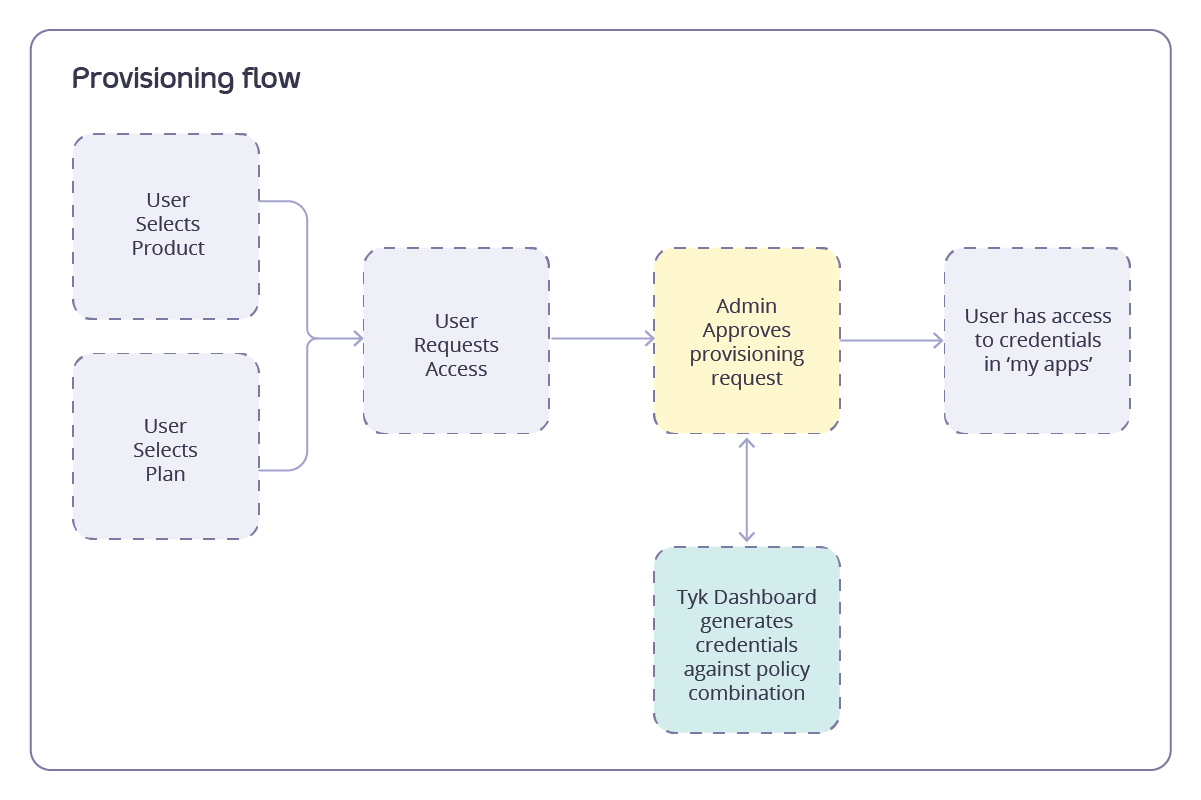
Requesting Access to an API Product
API Consumers can request access to API Products through the Live Portal using one of two configured flows. To learn how to configure this flow visit Access Flow TypesInitial Steps (Both Flows):
- From the Catalogues page, choose the API Product of interest and select More info
- On the API Product detail page, decide which of the available Plans to subscribe to and select Access with this Plan
- The next steps depend on your portal’s configured access flow:
Direct Access Flow
When Direct Access Flow is enabled, you can request access to API Products immediately without using a shopping cart. Steps:- You’ll be taken directly to the access request page with your selected product and plan pre-populated
- Select or create a Developer App to store your credentials
- Configure credentials (new or extend existing compatible credentials)
- Select Continue to submit your request
- Have the same Plan as the selected product
- Not already include the selected product
- Have a matching authentication type with the product
Cart-Based Flow
When Cart-Based Flow is enabled, you can add multiple API Products to a shopping cart before submitting a single access request. Steps:- The API Product and Plan combination will be added to your cart
- Repeat steps 1-2 for additional API Products you want to access
- Go to the Cart using the icon in the top right of the screen
- Review your selections and select a Developer App
- Select Submit request
After Submission
- Your access request will be submitted for approval (if required)
- Track request status in My Apps
- Once approved, credentials will be available in your selected Developer App
Manual Approval Workflow
The manual approval workflow provides API Owners with oversight of all API access. When an API Consumer completes an access request, API Owners receive notification of pending request via email and should then:- Navigate to the API Consumers > Access Requests page in the Admin Portal
- Review the request
- User name
- Developer App
- Requested API Products
- Selected subscription Plan
- Approve or reject the request from the three dot menu
- If approved, access is provisioned with credentials issued to the specified Developer App
- If rejected, access will not be granted
- API Consumer receives notification of the decision via email
Automatic Approval Workflow
For trusted users or specific API Products, you can enable automatic approval in the subscription Plan. To configure automatic approval, the API Owner should:- Navigate to the Plans page in the Admin Portal
- Select or create the API Plan that should be automatically approved
- Set the Auto approve access request checkbox
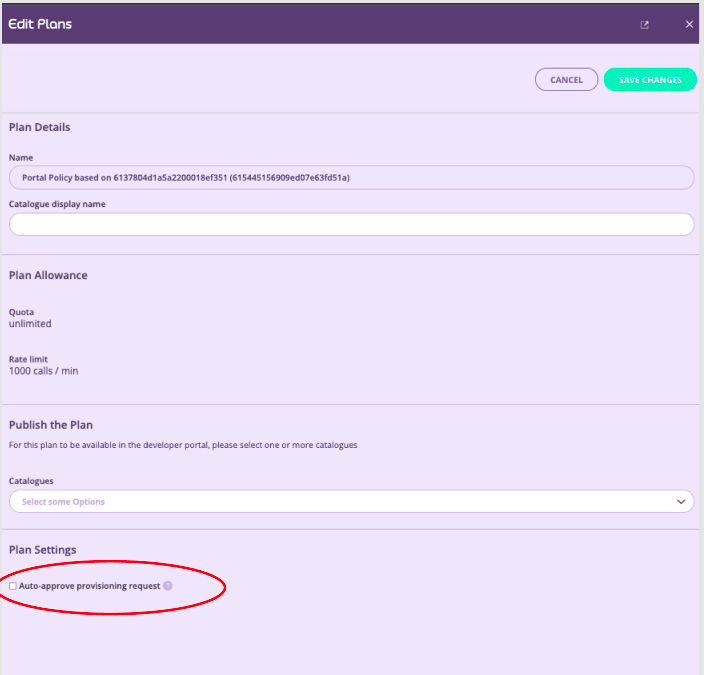
- Select Save changes
Despite automatic approval, a record of the request is maintained in the API Consumers > Access requests page in the Admin Portal.
Notification of Decision
The Dev Portal sends notification to the API Consumer when their request is approved or rejected. If the email service is configured, then:- When a request is approved:
- The system sends an approval notification email to the user
- The email uses the template “approve” with a configurable subject
- The notification includes details about the approved access
- When a request is rejected:
- The system sends a rejection notification email to the user
- The email uses the template “reject” with a configurable subject
Update Products and Plans of an Access Request
Starting from v1.16.0, the Tyk Developer Portal enables users to efficiently manage their access requests by adding or removing API Products and modifying subscription plans for existing credentials. This eliminates credential sprawl and provides a streamlined experience. The following features can be accessed via “App” page, under each access credential.Adding Products to Existing Access Request
Users can extend their existing credentials with additional API Products when compatibility requirements are met, avoiding the need to creating new credentials for additional API products. Compatibility Requirements Products can be added to existing credentials when they share:- Same authentication method
- Same subscription plan
- Products not already included in the credential